The cover page is the first page of your document where you enter the required basic identifying information prior to getting to the actual contents. It's needed in most professional and academic settings so that the readers know who wrote the document and to whom it belongs (i.e., to which class, department, journal, workplace, etc.). Although it seems like a minor detail, not having a cover page or having a sloppy-looking one could affect the overall appearance of your paper before anyone gets to the first paragraph.
In this article, I'll provide an overview of how to create a cover page, what details are usually included, and how to develop one for different styles, each with its own rules (APA, MLA, Chicago, etc.). Cover page examples will be included in the article as well, to assist you in correctly following the formatting details.
What Is a Cover Page?
A cover page is a separate opening page that gives a document its basic identity before the reader gets into the actual content. Depending on the assignment or format, it may include the title, author name, institution, course details, instructor name, and submission date. In academic writing, the cover page can also signal which style guide the paper follows, since APA, MLA, Chicago, and other formats handle first-page details differently. At its simplest, it keeps the document clear, complete, and easier to file or review.


Need to Fix Your Paper?
Send your draft and get support that helps the whole assignment feel more controlled.
When to Use a Cover Page?
You may not always need a separate cover page for short written assignments. However, when writing formal papers, having one gives your reader the information needed to understand your paper as soon as they pick it up. While a cover letter for essay is usually a separate note used to introduce a submission, a cover page is part of the paper itself and identifies the document through concrete details. Always refer to the assignment guide before assuming you need one, though, because different professors and schools can have very different requirements. You may need to use a cover page in these cases:
- Research papers: Most college research papers require a separate title page; this is typically the case for APA style or any form of formal course submissions.
- Essays with specific formatting rules: Some professors ask students to use a separate title page, even though the MLA format calls for including the student details on the first page.
- Reports: Business, lab, and project reports typically require you to have a clean title page that includes the title of the report, the name of the author, the name of the organization, and the date that the report was completed.
- Theses and dissertations: Longer academic papers typically require that you submit a formal title page that has been approved by your department.
- Professional proposals: The first thing that the client will see when looking at the document is the title of the project, the name of the company, contact information for the person submitting it, and when it was submitted.
How to Make a Cover Page?
Start with the required cover page format. APA, MLA, Chicago, and business reports all handle details in slightly different ways, so the format should guide your layout. When making a cover page, include only the information the reader needs before the document begins.
Most cover pages include:
- Paper title
- Author name
- Institution
- Course name
- Instructor name
- Due date
- Company name
- Client name
- Logo
- Report number
- Contact information
Keep the page clean. Center the main details, use readable spacing, and avoid decorative fonts that make the page look less serious.
How to Make an APA Cover Page?
APA style has clear rules for title pages, and the current standard is APA 7th edition. If you need to know how to make a cover page in APA, start by checking one detail first: student papers and professional papers have different title page requirements. Most college assignments use the student version unless the instructor asks for something else.
An APA cover page should look clean, centered, and easy to scan. The goal is simple: give the reader the paper’s identity before the argument begins.
Use these APA 7th edition formatting rules:
- Page number: Place page number 1 in the top right corner of the header.
- Paper title: Put the full title in bold, centered, and near the upper half of the page.
- Title capitalization: Use title case, so major words begin with capital letters.
- Author name: Add your name under the title. Use the form your school or instructor expects.
- Institution name: Include your college, university, or school name under your name.
- Course information: Add the course number and course name on the next line.
- Instructor name: Write the instructor’s name clearly, with the title they prefer.
- Due date: Add the submission date under the instructor’s name.
- Spacing: Use double spacing across the whole page.
- Font: Use a readable APA-approved font, such as 12-point Times New Roman, 11-point Calibri, or 11-point Arial.
- Running head: Student papers usually do not need a running head unless the instructor requests one.
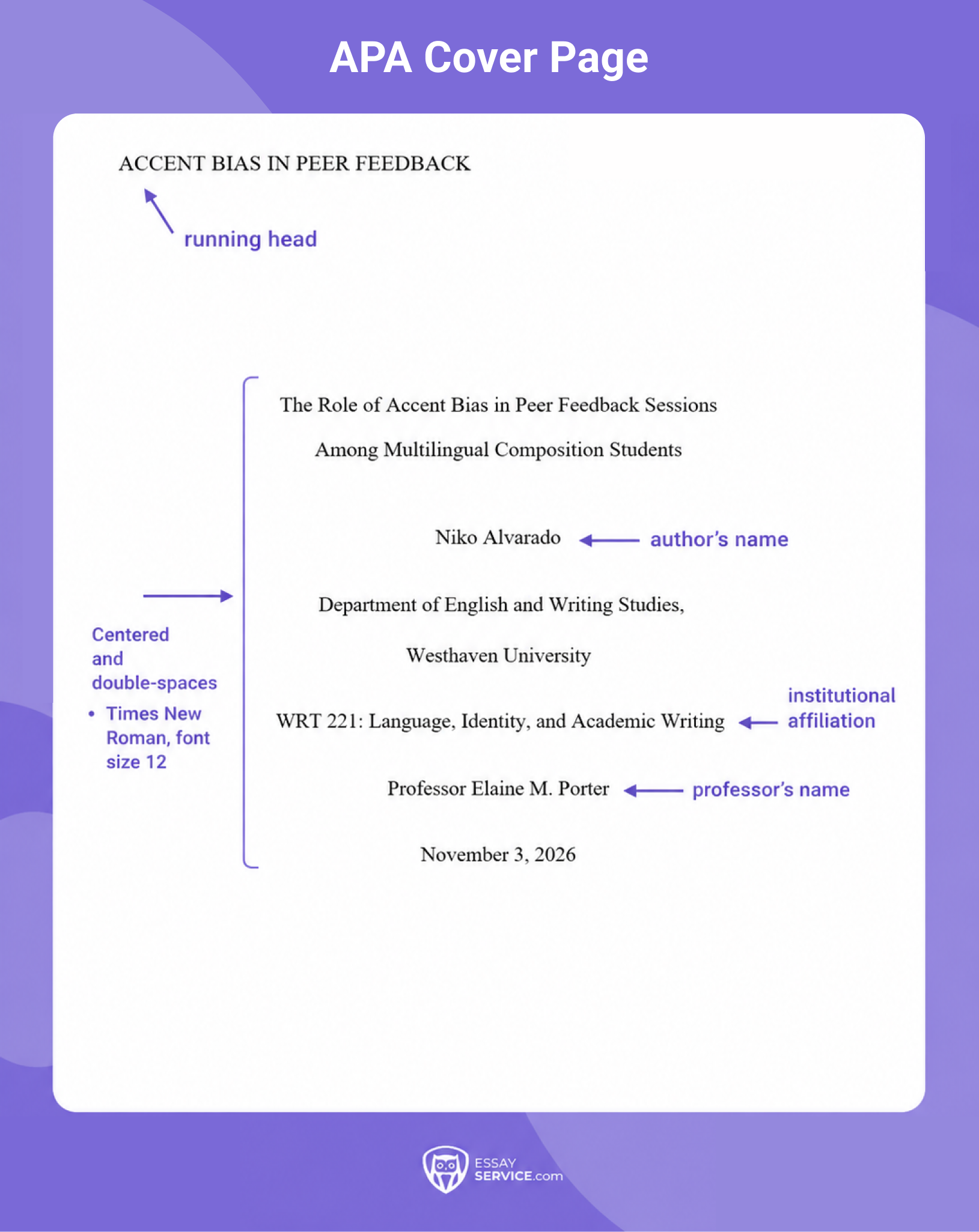
APA Cover Page Example
Here’s how an APA cover page should look when the required details are placed in the correct order and spacing.
How to Make an MLA Cover Page?
The current standard is MLA 9th edition, and most MLA papers do not require a separate title page. A standard MLA cover page usually begins with your name, instructor name, course, and date in the top left corner of the first page. Still, some instructors ask for a separate cover, especially for longer essays or formal projects.
When that happens, follow the assignment instructions first. MLA gives general formatting guidance, yet your teacher’s directions may dictate the exact layout. Use these MLA 9th edition formatting rules when a separate page is required:
- Title placement: Center the paper title about one-third down the page.
- Title style: Use title case. Capitalize major words in the title.
- No bold or italics: Keep the title in regular font unless it includes a work title that needs italics.
- Student name: Place your name below the title, usually centered.
- Course details: Add the course name or class number on a separate line.
- Instructor name: Include the instructor’s name below the course details.
- Date: Write the date in MLA style, such as 12 May 2026.
- Font: Use a readable font, usually 12-point Times New Roman, unless your instructor allows another option.
- Spacing: Keep the page double-spaced.
- Margins: Use one-inch margins on all sides.
- Page number: Add your last name and page number in the top right header if your instructor wants standard MLA pagination.
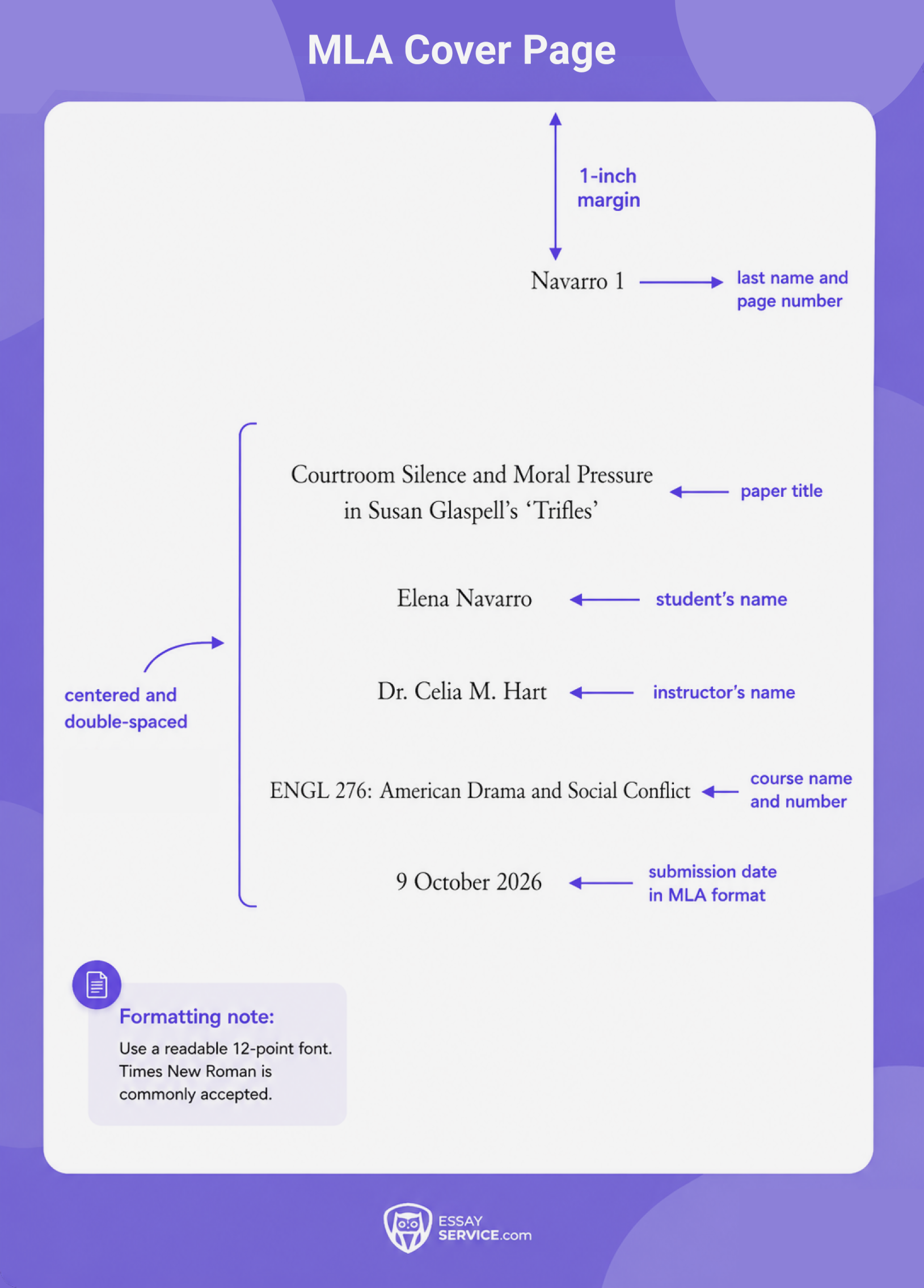
MLA Cover Page Example
MLA cover pages are less common, so this example shows the version used only when an instructor specifically requests one.
What to Avoid When Making a Cover Page
A cover page will instantly look off because of the wrong formatting choices. Here are a few instances where the issues and mistakes most commonly stem from:
- Mixing citation styles: APA, MLA, Chicago, and business reports all organize the first page differently. A cover page that uses an APA title layout with MLA header habits can look careless, even when the information itself is accurate.
- Treating the title like a poster headline: Large lettering, unusual spacing, color, or decorative fonts usually work against the page. Academic formatting needs control, and yes, that often means the page looks plain.
- Getting the header wrong: APA 7th edition uses a page number in the top right corner. MLA 9th edition often uses the student’s last name with the page number when standard pagination applies.
- Using the wrong title capitalization: Many cover pages use title case, so the major words begin with capital letters. Sentence case can look incorrect in formats that expect formal title styling.
- Adding a running head automatically: APA 7th edition student papers usually do not need one. Add it only when the instructor specifically asks.
- Ignoring assignment notes: Style guides give the baseline, but the class prompt may still add its own rule. That small instruction at the bottom of the page is easy to miss, annoyingly enough.
A college essay writing service can help you get all the formatting details just right for any of your assignments.
Upgrade Your Draft
Hand your paper to an expert who can sharpen the argument and clean up weak sections
Final Thoughts
A cover page gives the document its first layer of order: title, author name, course details, institution, instructor, and date, when the format asks for them. APA, MLA, Chicago, and professional reports each arrange those details differently, so the safest approach is to follow the assigned style carefully and keep the page clean.
Frequently Asked Questions
What Is a Cover Page?
When Should I Use a Cover Page?
What Does a Cover Page Look Like?
What’s the Difference Between APA vs. MLA Cover Page?

John spends his days studying the impact of language. He uses his deep understanding of linguistics and research experience to help students communicate more effectively and craft immaculate research-intensive papers.
- Purdue Writing Lab. (2018). MLA general format. Purdue Writing Lab; Purdue University. https://owl.purdue.edu/owl/research_and_citation/mla_style/mla_formatting_and_style_guide/mla_general_format.html
- Purdue Writing Lab. (2019). APA General Format. Purdue Writing Lab; Purdue University. https://owl.purdue.edu/owl/research_and_citation/apa_style/apa_formatting_and_style_guide/general_format.html



New posts to your inbox
Your submission has been received!